Join The Club




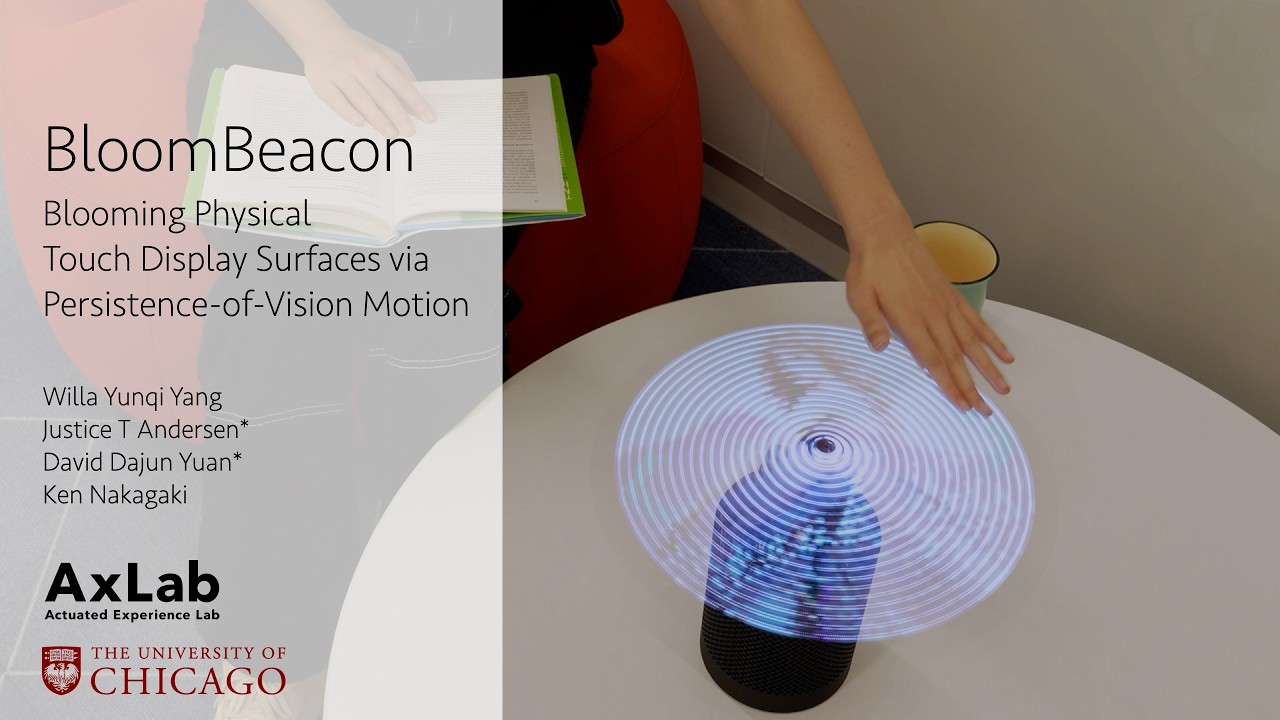
'Hologram' fans are cool, and coming to an Asus PC case near you. Unfortunately, there's still a part of my brain that would rather disregard the obvious safety concerns and continues to insist 'I bet the robot voice from this hologram fan would sound sick—you just need to lean in a wee bit closer.' Thankfully, a team out of the University of Chicago has created a soft holo fan that will save me from myself.
Called the BloomBeacon, the project features two soft and flexible blades for the purposes of creating a touchable holographic display. One of the arms is covered in LEDs, the other features capacitive pads for touch sensing. That means this holofan isn't only safe-to-poke, but waving your phalanges around this spinning device is kind of the whole point (via Hackaday).
The device's name refers to 'blooming,' "a concept that repurposes Persistence-of-Vision (POV) motion to deploy a large, touchable surface from a compact, relocatable device." The 'sensing blades' are swappable too, allowing users to swap in electrodes of varying heights that, in turn, can create a variety of tactile sensations.


The research team behind the BloomBeacon pitch a number of use cases. These range from casual applications, like using the device to augment a speaker and skipping between music tracks via the holographic display, to, err, avoiding chemical burns.
Let me explain: the device can 'bloom' into life when it detects nearby motion. So, when a user attempts to reach for a hazardous chemical without gloves, the BloomBeacon can start up and create a "physical surface in mid-air that blocks access"—or at least offers an attention-averting amount of resistance.
Pitched as a "a safety-oriented device design," those soft blades aren't just friendly to wayward fingies, but also avoid tangling loose strands of hair by automatically stopping when it detects resistance. Alas, that means I probably won't be able to get the cool robot voice the safety-averse part of my brain seeks, but perhaps that's for the best.
1. Best overall:
Noctua NF-A12x25 G2
2. Best midrange:
Noctua NF-P12 redux-1700
3. Best budget:
Arctic P12 PWM PST
4. Best RGB:
Corsair iCUE LINK QX120 RGB
5. Best budget RGB:
NZXT F120 RGB Duo
6. Best for radiators
Arctic P12 Pro