


An air cooler remains a solid choice for your gaming PC in 2026. They're affordable, dependable, and plenty capable even for a demanding chip. We've tested a pile of coolers to make our recommendations in this guide, so check out the list below for the best air coolers in 2026.
For a quick idea of what's hot and what's not, our top pick is the Arctic Freezer 36. This cooler is outstanding across the board, with impressively low temperatures and noise levels. What's more, it costs a fraction of some air coolers. For most PC gamers, the Freezer 36 is all you really need.
If you prefer an overkill option, the Thermalright Peerless Assassin 120 SE is just that. It's a dual-tower cooler that often sits at the top of our performance charts, and even better, it's also very affordable. It's a big cooler for the price of a small one.

Jacob has set-up a rig for testing CPU coolers at home—that's how dedicated he is to the task of finding the best available. It's also quite useful to have a bunch of fans around during the summer. Anyways... With eight years of experience, he's dealt with the chilliest coolers, and those that were, quite literally, too hot to handle.
August 14, 2026: We've refreshed our picks after a fresh round of cooler testing.
June 11, 2025: Added the fantastic Arctic Freezer 36 and smaller tweaks throughout.
March 10, 2025: Added a section for our test results.
The best air cooler


✅ You want to replace a stock cooler: There's no big reason to spend more than this on your air cooler. Not unless you're trying to keep an enthusiast-grade chip cool.
❌ You want to push your processor: This cooler can deal with modern Core Ultra and Ryzen processors, but it's less able with power-hungry 13/14th Gen chips or overclocking.
The Arctic Freezer 36 is unbeatable, and an easy pick for the best air cooler. There's not much more you could want than this; it delivers superb performance for a very low cost.
The Freezer 36 includes two P12 PWM PST fans. These aren't anything special, and maybe in need of an upgrade to the newer P12 Pro, but they're surprisingly quiet. As a result, this is the quietest cooler we've tested recently.
Our test bench uses an Intel Core i7 14700K, tough going on any air cooler. The Freezer 36 holds up well to the onslaught. You likely want one of the best liquid coolers to push this chip to its limits; however, modern, power-savvy chips are happy under the Freezer 36. It performs very well with a chip at 180 W; moreover, it can handle up to a steady 230 W.
It comes with a contact frame for Intel chips; a piece of metal that replaces the ILM (Independent Loading Mechanism) on the motherboard. It helps prevent the chip from bending—only slightly—and maintain even pressure over the chip for optimal cooling performance. That's an issue with older Intel chips, like our test chip, but even on the newer models, it's nice to have the option at no extra cost for peace of mind.
The installation process is a little trickier on Intel builds for the inclusion of the contact frame, but if you're careful, you won't break anything. And you likely only have to do it once. The install process is a breeze on AMD chips.
Arctic also includes a tiny tube of its MX-6 thermal paste in the box. Enough for an install or two, at the very least.

Read our full Arctic Freezer 36 review.
The best budget air cooler


✅ You've blown your budget on other parts: If you've little to spare for a cooler or want to replace a stock cooler, the Freezer 36-S is very affordable.
❌ You can still spare a few bucks more: There's very little between the Freezer 36-S and Freezer 36 in terms of cash, but the Freezer 36 is a much more capable cooler.
The Arctic Freezer 36-S is a slimmed back version of the Freezer 36. It's a little smaller, includes only one fan, and pared back to meet its new price point: around $20/£20.
It's not so much cheaper than the Freezer 36 to always earn our recommendation; however, for anyone looking for the most minimal of costs to upgrade their chip chiller, it's an excellent option considering how little money it demands.
There's one P12 Pro fan on the Freezer 36-S. In one way, that's a slight improvement on this cooler compared to the Freezer 36, which comes with the older P12 PWM PST. Though the Freezer 36 has two of them, and the Freezer 36-S only one, which makes a difference to temperatures in testing. Similarly, the P12 Pro fan runs quite loud at top speed, a whole 7 decibels above the Freezer 36.
The Freezer 36-S is much more capable than the similarly-priced Cooler Master Hyper 212 Pro. So that's been wholly replaced as the de facto pick for budget builds, but that's probably been true for a while. The Freezer 36-S is also a step-up on the Be Quiet! Dark Rock 5. That cooler has recently been replaced by the more capable Dark Rock 6, but it costs a whole lot more so it's not really a match for the Freezer 36-S.
There is a contact frame included with the Freezer 36-S, though unlike the one with its bigger sibling, it's only made of plastic. It gets the job done, anyways.
Altogether, it's a smart-looking and impressive cooler for the money. We'd still pick the Freezer 36, but if you can't spare the cash, this is more than enough for most.

Read our full Arctic Freezer 36-S review.
The best dual-tower air cooler


✅ You want top performance for less: Big, loud and mighty. The Peerless Assassin 120 SE is a great cooler.
❌ You care about quiet: The Peerless Assassin is not a stealthy killer; it's loud. The loudest we've tested, actually.
The Thermalright Peerless Assassin 120 SE is in a league of its own. No desktop chip runs hot under this thing, but more importantly, it costs a fraction of what other similarly-performing air coolers demand. Around $40/£36.
The Peerless Assassin 120 SE is among the top performers in my testing, alongside the Noctua NH-D15 G2. It doesn't always beat that impressive cooler, often within a degree or two, but it does sometimes match it. Considering the price delta between them, that's darn good.
With an Intel Core i7 14700K at 1.325 V in Prime95, a roughly 230 W thermal load, the Peerless Assassin 120 SE maintains it at a steady 71 °C. That's matched only by the Cooler Master V8 Ace 3DHP, and beaten only by the NH-D15 G2 at an impressive 66 °C.
It is a loud cooler, the loudest I've tested as of late, reaching a mighty 50 decibels from 40 cm away. That's 10 decibels higher than the Freezer 36 and 5.5 decibels higher than the Noctua NH-D15 G2. So, for those that value silence above all else, I'd recommend one of the other coolers on this list. Though you can always turn the fans down a touch in your BIOS to help keep the noise down.
That particularly low price tag helps to cover for this cooler's noise. If you have the space in your case, you won'd find much better for the money than the Peerless Assassin 120 SE.

Read our full Thermalright Peerless Assassin 120 SE review.
The best low profile air cooler


✅ You have limited space: This cooler packs into a tiny space, thanks to a fan that can be stuffed inside or outside the heatsink.
✅ You want a quiet option: Despite a smaller fan, which usually makes for a louder fan, this runs pretty quiet with a relatively low-power CPU.
❌ You have room for something a little bigger: Even a slim single-tower air cooler will outperform this. Unless you absolutely need the minimal footprint, buy something a little bigger (and cheaper).
The Noctua NH-L12S is the best air cooler for a tight space, Mini-ITX motherboard, or small form factor case. It can keep a chip surprisingly cool for its pancaked heatsink and thinner than usual fan.
The Noctua NH-L12S makes fitting an air cooler into a cramped space rather easy. As easy as it could be, anyway. I say that with experience: I built my dream mini PC inside the Fractal Terra, and I found it all surprisingly easy. Sure, I did have to reinstall the cooler once (only once!) due to some wishful thinking on my part, but it all fit in there rather easily.
You can install the included Noctua NF-A12x15 PWM fan in one of two ways: between the coldplate and heatsink or to the outside of the heatsink. Either works great, but inside the cooler delivers maximum space savings. Once installed, the fan helps cool the chip and gets some airflow over your VRM.
This cooler comes with four heatpipes. While you need to be aware of the dimensions of this cooler (70 x 128 x 146 mm), your motherboard, and your case, it's often only a little taller than the motherboard itself once installed and fits into most tight spaces. If you can spare more room, the NH-L12Sx77 is similar to the NH-L12S, except it has six heatpipes and greater clearance at 77 x 128 x 131 mm.
With a very sensible AMD Ryzen 7 9700X, a 65 W CPU, I measured just 70°C on average during gaming, and a maximum of 76°C. Even when I hammered the chip with Cinebench and other demanding workloads, it hit 79°C. That's super impressive.

Read our full Noctua NH-L12S review.
The best passive air cooler
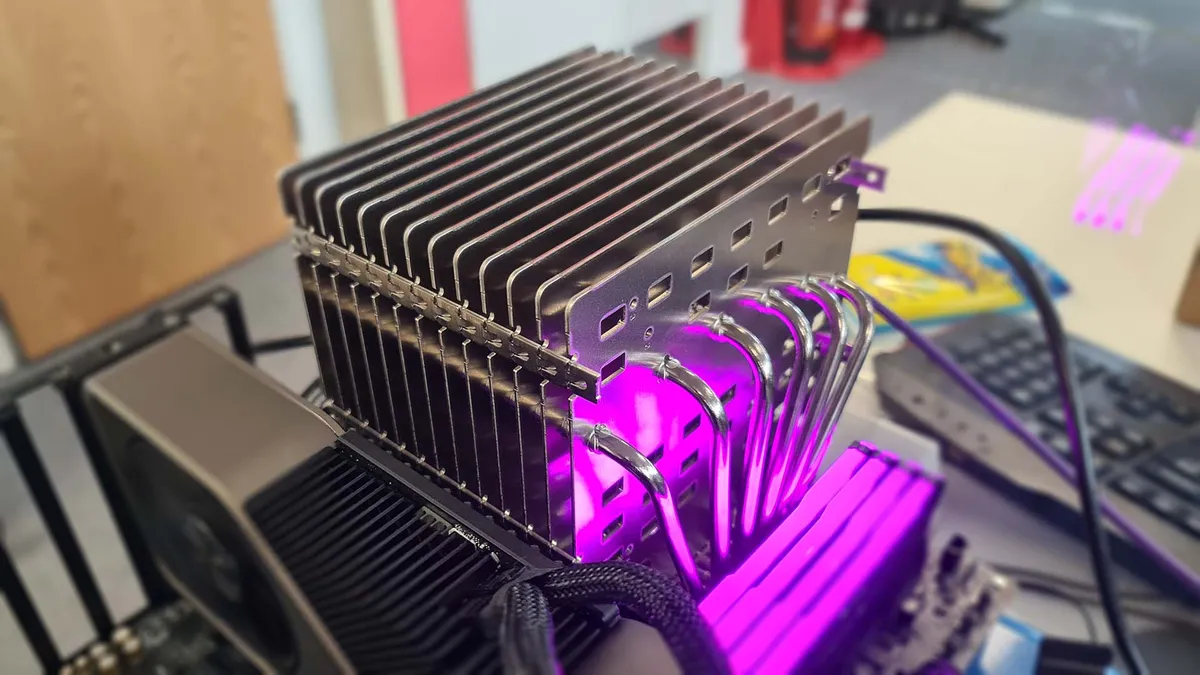


✅ You want complete silence: With the NH-P1, you can build a completely silent PC. It won't be powerful, but it will be inaudible bliss.
❌ You're going to stick a fan on it: If you need a chiller for a high-end CPU, don't use a passive cooler. Sure, you can add a fan to it, but then it's an expensive alternative to the Thermalright Peerless Assassin 120 SE.
Noctua’s NH-P1 is the best passive air cooler for CPUs because (1) it does the job extremely well, and (2) it's one of the very few that tries. Today's powerful processors demand large amounts of cooling, and few manufacturers feel up to the task of designing a cooler to do that without any fans whatsoever.
Noctua, famed for its beige and brown fans and cooling products, is one such company. And the NH-P1 is a product that many have been waiting for for a very long time.
The NH-P1 is expensive, bulky, and generally limited to CPUs in the 65 W range—even lower if you run it without any fans around. Sounds like a dud? Hell no. Its appeal may be limited, but if you're a user who values silence above anything else, then the NH-P1 will be exactly what you're looking for.
The NH-P1 uses only natural convection to keep a chip cool. No fans here. There are fewer fins to its heatsink than most air coolers, which might seem counterintuitive, but they're much thicker. It features a grid of cut-outs horizontally through the cooler design, which helps air flow naturally across the cooler and, importantly, sap away the heat transferred into the fins from the heatpipes.
While it does work without any fans around, it can retain heat without some active airflow, reducing its cooling efficiency. That's hardly a surprise; the rest of these air coolers don't come with fans just for the thrill of it. It does much better with at least a case fan or two blowing around it, even if from a distance.
The NH-P1 is built for a specific purpose. It's niche, no doubt about that, but fans of quiet computing will love it. If you sleep near your PC or run a lounge room media center, the NH-P1 will ensure that your PC is truly silent. It's just not meant for everyone, or every CPU.

Read our full Noctua NH-P1 review.
How we test air coolers
We put all of the air coolers we review through a benchmarking suite designed to inform us about the limitations of any given cooler. We use an Intel Core i7 14700K for all our testing, as this chip draws plenty of power at up to 253 W, which gives us lots of flexibility for testing a cooler.
We run the Core i7 14700K at two fixed voltages: 1.275 V and 1.325 V. The higher the voltage, and the more intensive the workload, the more heat this chip generates.
We take the average and maximum CPU temperature across various stress tests, which we run for extended periods and using different settings. The tests are:
- Baldur's Gate 3 - A 5-minute gameplay test
- x264 encoding - A spiky test that bounces between 90 W and 165 W
- Prime95 - An intensive test that hammers many of the CPU cores at once
Check out the results below:
Temperature benchmarks w/ air coolers
Evaluating cooler effectiveness with a Core i7 14700K
| Product | Value |
|---|---|
| Arctic Freezer 36 | 79 Max °C, 75 Avg °C |
| Arctic Freezer 36-S A-RGB | 80 Max °C, 76 Avg °C |
| Be Quiet! Dark Rock 5 | 90 Max °C, 85 Avg °C |
| Be Quiet! Dark Rock 6 | 83 Max °C, 78 Avg °C |
| Be Quiet! Dark Rock Pro 6 | 82 Max °C, 74 Avg °C |
| Cooler Master Hyper 612 Apex | 78 Max °C, 73 Avg °C |
| Cooler Master V8 Ace 3DHP Black | 76 Max °C, 71 Avg °C |
| Noctua NH-D15 G2 (Standard Version) | 73 Max °C, 66 Avg °C |
| Thermalright Peerless Assassin 120 SE | 80 Max °C, 71 Avg °C |

Finally, we record the noise produced by the fan(s) at 100% speed. Here are the results:
Noise levels - air coolers
Fan noise for various air coolers, as measured from 40 cm away
Fan noise | 40 cm away
| Product | Value |
|---|---|
| Arctic Freezer 36 | 40 @100% (dBA), 35 Noise floor (dBA) |
| Arctic Freezer 36-S A-RGB | 47 @100% (dBA), 35 Noise floor (dBA) |
| Be Quiet! Dark Rock 5 | 49 @100% (dBA), 35 Noise floor (dBA) |
| Be Quiet! Dark Rock 6 | 49 @100% (dBA), 35 Noise floor (dBA) |
| Be Quiet! Dark Rock Pro 6 | 48 @100% (dBA), 35 Noise floor (dBA) |
| Cooler Master Hyper 212 | 44 @100% (dBA), 37 Noise floor (dBA) |
| Cooler Master Hyper 612 Apex | 45 @100% (dBA), 37 Noise floor (dBA) |
| Cooler Master V8 Ace 3DHP Black | 48 @100% (dBA), 35 Noise floor (dBA) |
| Noctua NH-D15 G2 (Standard Version) | 44.5 @100% (dBA), 35 Noise floor (dBA) |
| Thermalright Peerless Assassin 120 SE | 50 @100% (dBA), 35 Noise floor (dBA) |
Frequently asked questions
Should you use a liquid or air cooler for your gaming PC?
Liquid cooling tends to be viewed as the premium solution. That's fair enough, as they do tend to offer higher performance for higher prices. But air cooling remains perfectly viable if you're looking to save some cash, keep the noise down, or build in a tight space.
The latest generations of processors from both AMD and Intel tend to be easier on power than the previous lot, which means you can get more mileage out of an air cooler today. There are also useful tricks like AMD's Eco Mode, which tunes the chip down for a lower power draw, thus making it easier to keep cool with a smaller cooler, too. This is especially useful with small form factor cases.
If you are building a tiny PC, your own Steam Machine, an air cooler can be a very useful thing. You won't find much better than a compact air cooler, like Noctua's NH-L12S, that can achieve so much in so little space. Plus it keeps your VRM cool when case fans are hard to come by.
The components around your CPU, such as the power circuitry and NVMe SSDs, can get hot and throttle if they're not properly cooled. And with a liquid cooler, they often get no help, not unless your AIO comes with a compact fan on the coldplate. A good downward blowing CPU air cooler will not just chill your processor, but also other parts on the motherboard.
Noise levels are highly dependent on the fans used, but if you choose wisely, there’s no reason an air cooler won’t be as quiet or even quieter than an AIO.
As with all things in PC hardware, it often comes down to what's affordable for you. In this case, air coolers are by far the cheaper option. There are a few exceptions to that rule, on both sides, but air coolers generally run a lot cheaper than their damp brethren.
